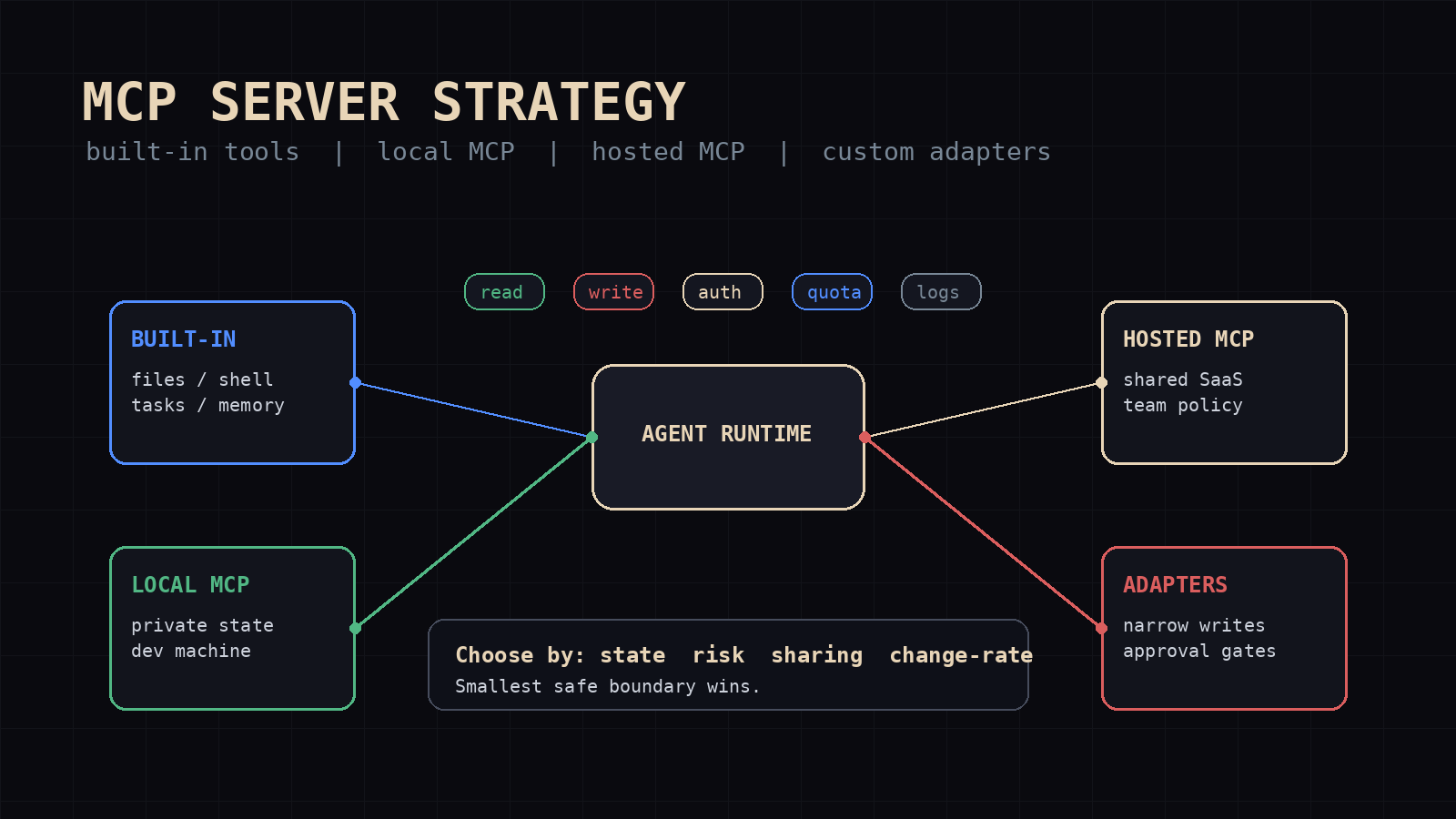
How to Choose an MCP Server Strategy for Your AI Agent Stack
MCP gives agent tools a shared shape. The official Model Context Protocol docs frame MCP as an open protocol for standardizing how applications provide context to LLMs. That standard is useful. It is also dangerous because every integration looks like it deserves a server.
That is how agent stacks become glue-code sprawl. A developer adds a filesystem MCP server, then a GitHub server, then a database server, then a Slack server, then one private server for a half-finished API. Two weeks later the agent has 80 tool names in context, three token-bearing subprocesses, unclear write permissions, and no one remembers which path is canonical.
The question is not "should I use MCP?" The question is where MCP belongs in the stack.
I treat MCP servers as boundary objects. They are good when the boundary is stable, shared, and worth standardizing. They are bad when the boundary is private to one workflow, changing daily, or safer as a built-in tool.
This is the framework I use for agents.
The four integration shapes
Most agent stacks end up with four tool integration shapes:
- Built-in tools
- Local MCP servers
- Hosted MCP servers
- Custom adapters
Each one has a job.
Built-in tools are part of the agent runtime. Terminal, file reads, file writes, browser access, cron, memory, and kanban belong here when they are core control surfaces. The agent already knows their contracts. They are versioned with the runtime. They are easier to audit because every run touches the same implementation.
Local MCP servers run beside the agent on the same machine. They are the right fit for private state, developer tooling, local databases, private vaults, and anything that should not cross the network. A local filesystem server, a local SQLite inspector, or a private build-system server fits this shape.
Hosted MCP servers run somewhere else. They make sense when several agents or users need the same tool surface, or when the service already lives behind an API boundary. A hosted GitHub, Linear, CRM, or internal platform server gives the team one contract instead of every agent carrying a different wrapper.
Custom adapters are the boring escape hatch. Sometimes the right answer is one hand-written tool with three arguments and one return schema. Not everything deserves MCP. If a workflow needs one endpoint, one strict permission set, and one narrow behavior, an adapter is often safer and cheaper than a full server.
These are not maturity levels. Hosted MCP is not automatically better than a local tool. A custom adapter is not a failure to standardize. The right choice depends on state, risk, sharing, and change rate.
Start with the agent's actual job
I start with the job, not the tool catalog.
If the agent writes files, opens pull requests, updates tickets, sends messages, or touches customer data, the integration strategy has to model risk. If the agent only reads docs and summarizes them, the boundary can be looser.
For each tool surface, I ask five questions:
- Is this read-only or write-capable?
- Does it touch private, regulated, or customer data?
- Is it used by one agent or many agents?
- Does the interface change weekly or rarely?
- Would a bad call be annoying, expensive, or irreversible?
Those answers usually pick the shape.
A read-only documentation lookup used by five agents is a good MCP candidate. A write-capable billing action is not a generic tool. It needs a narrow adapter, explicit approval state, and a log that records amount, account, counterparty, and timestamp.
That same distinction shows up in monitoring. In Monitoring AI Agents in Production, I wrote that side-effecting tool calls need their own audit trail. MCP does not remove that requirement. If anything, it makes the audit boundary more important because the same server can expose many actions under one protocol.
Use built-in tools for core control surfaces
Some capabilities should live inside the agent runtime.
I want file reads, file writes, shell commands, process management, task state, memory, and scheduler access to be built-in unless there is a strong reason to move them out. These are not random integrations. They are how the agent operates.
When core operations live as MCP servers, the stack gains failure modes:
- the server fails during startup discovery
- tool names change when the package updates
- permissions drift outside the agent runtime
- local subprocess state becomes harder to inspect
That does not mean filesystem MCP is wrong. It means I would use it for a constrained workspace or a shared protocol boundary, not as the only way the agent reads its own repo.
Hermes is a good example of this split. The native tool layer handles terminal, files, kanban, memory, cron, browser, and messaging where the runtime owns delivery policy. MCP servers add external surfaces. That keeps the agent's operating loop stable and keeps tool bloat down. The agent does not need five ways to read a file. It needs one default path and special cases only when the boundary earns them.
Use local MCP for private state and developer machines
Local MCP is the best fit when the agent needs to talk to software that already lives on the box.
Examples: local Postgres or SQLite, an Obsidian vault, a private issue cache, a code search index, a browser automation bridge, a build-system inspector, or a localhost model server.
Local servers give you protocol structure without sending data to a hosted service. They also map well to individual operator stacks. My agent org has local state, vault state, git state, and task state. Some of that belongs in runtime tools. Some of it could live behind MCP if multiple clients needed the same contract.
A local MCP server is still code execution. It can read files, receive credentials, call network services, and mutate state. I review local servers like plugins: what process runs, what environment it receives, what paths it can touch, what actions it exposes, and what logs it leaves.
For stdio MCP servers, environment hygiene matters. Pass only the credentials the server needs. Do not hand a subprocess the entire shell environment. If the server needs a GitHub token, pass that token explicitly and keep the scope narrow.
A local MCP server should also have a short tool list. If I connect a local database server, I do not want 25 generic database actions visible to a writing agent. I want read-only query access unless the job requires writes.
Use hosted MCP when the contract is shared
Hosted MCP becomes useful when the same tool surface is used by multiple agents, multiple humans, or multiple machines.
The strongest hosted cases are systems that already have shared identity and policy: GitHub, Linear, Jira, Google Workspace, internal deployment platforms, observability, support systems, and company knowledge bases.
A hosted server gives the team one integration boundary. Instead of every agent carrying its own GitHub wrapper, the server owns auth, rate limits, schema, pagination, and policy.
A hosted server with broad permissions is a shared failure surface. If it exposes ticket writes, repo writes, database writes, and messaging writes, one bad prompt can move across the company. Split hosted MCP servers by blast radius.
I prefer servers like this:
github_read: repo search, issue reads, PR readsgithub_write: issue comments, branch operations, PR creation, gated by approvalops_read: logs, metrics, incidentsops_write: deploy actions, rollbacks, requires explicit human approvalcrm_read: account lookup onlycrm_write: restricted to approved fields and logged writes
This is less elegant than one mega-server. It is easier to operate.
A hosted MCP server should also return structured errors: auth, rate limit, validation, missing object, unsafe action, or transient network failure. A vague error string creates retry loops. A typed error lets the model stop or escalate.
Use custom adapters for narrow dangerous actions
Custom adapters are underrated.
MCP is a protocol. It is not a safety system. If the action is narrow and dangerous, I usually want a narrow adapter with fewer degrees of freedom.
Good adapter candidates:
- send this approved message to this exact channel
- create an invoice draft, never send it
- update one field on one internal object type
- trigger one deployment command with a fixed environment list
- append one validated row to one ledger table
- run one report with a fixed query shape
These tools have small schemas, are cheap in context, and are harder for the model to misuse because the action surface is small.
A custom adapter also lets the agent runtime enforce policy before the call leaves the process. That matters for approval gates. The adapter can require a task id, a human approval id, a diff summary, or a dry-run hash. If only one workflow needs it, the adapter is often the cleaner choice.
The pattern is the same one I use for agent prompts: make the default path obvious and the unsafe path explicit. How to Write a SOUL.md That Actually Works is about agent identity, but the same principle applies to tools. Boundaries beat vibes.
The decision table
Here is the short version I use:
| Situation | Default choice | Why | | --- | --- | --- | | Core agent operation: files, shell, task state, scheduler, memory | Built-in tool | Stable runtime path, lower context cost, easier audit | | Private local resource used by one operator | Local MCP | Standard protocol without exposing private state remotely | | Shared SaaS or internal platform used by many agents | Hosted MCP | One contract, one auth boundary, one operational surface | | One narrow high-risk write action | Custom adapter | Smaller schema, tighter policy, easier approval gate | | Experimental API changing every week | Custom adapter first | MCP server will harden too early and carry churn | | Read-heavy knowledge lookup with many clients | MCP server | Reusable query contract beats duplicate wrappers | | Tool surface with 30 actions but one agent needs two | Adapter or filtered MCP | Do not pay context and risk for unused actions | | Workflow that needs human approval before writes | Adapter or split MCP servers | Approval belongs in the tool boundary, not only the prompt |
If the table feels too simple, that is the point. Integration strategy fails when every decision becomes an architecture debate. Most tool surfaces have an obvious shape once you separate read/write, local/shared, and stable/changing.
The operational checklist
Before adding an MCP server to an agent stack, I want these answers written down:
- What job does this server remove from the agent runtime or adapter layer?
- Which agents need it?
- Which tools from the server will actually be exposed?
- Is each tool read-only, write-capable, or externally side-effecting?
- What credentials does the server receive?
- What is the smallest permission scope that works?
- What data can pass through the server?
- Does the server log calls, arguments, outcomes, and errors?
- Are secrets redacted from logs and model-visible errors?
- What are the timeout, retry, quota, and usage-alert rules?
- What happens if the server fails at startup?
- Can the agent complete degraded work without it?
- Who owns the server, upgrades, and schema changes?
- How do we remove it if it becomes dead weight?
Tool integration is easy to add and hard to prune. I want an exit path before the server becomes infrastructure.
My default test is harsh: if no agent used the server in seven days, hide it from the default toolset. Delete it if no owner defends it. A tool that is rarely useful still taxes context, review, startup time, and operator attention.
A concrete stack layout
For a practical developer agent stack, I would start here:
Built-in runtime tools:
- file read and write
- terminal and process control
- browser or HTTP fetch
- task state
- memory
- scheduler
- messaging only if the runtime owns delivery policy
Local MCP servers:
- local database read server for development
- private vault or notes query server
- local model or embedding server if multiple clients need it
- repo-specific code search if it beats normal file search
Hosted MCP servers:
- GitHub read server
- GitHub write server separated and approval-gated
- Linear or Jira server for shared product work
- observability read server
- internal docs search server
Custom adapters:
- publish a reviewed post
- send an approved outbound message
- update billing state
- trigger deployment
- write to finance records
- perform irreversible customer-facing changes
This layout keeps the default agent small, gives MCP the shared boundaries, and keeps dangerous writes narrow.
It matches how real agent stacks evolve. In Configured Architecture vs Live Architecture, I wrote about the gap between the clean diagram and the system that actually runs. Tool wiring has the same problem. The diagram wants uniformity. The live system wants the shortest safe path.
The anti-patterns I avoid
The first anti-pattern is the mega MCP server. One server exposes every action for a platform: read, update, delete, export, send messages, alter permissions. It looks efficient. It creates one fat blast radius.
The second is duplicate paths. The agent has a built-in file reader, filesystem MCP server, code search server, and shell fallback. It spends tool calls deciding how to inspect a file instead of doing the work. Pick a default and document exceptions.
The third is hidden writes. A tool name sounds read-only but triggers side effects: sync_customer, refresh_project, resolve_ticket. Write tools need write names. If a call changes external state, make that obvious in the schema and in the logs.
The fourth is unowned servers. Someone added the server during an experiment. The package updates. Tool names drift. Startup logs fill with warnings. Agents silently lose a capability. Every server needs an owner and a removal path.
The fifth is putting policy only in the prompt. Prompts are necessary. They are not enough. If the tool should never transfer money, delete data, publish content, or message customers without approval, enforce that in the tool boundary.
My rule of thumb
Use MCP where standardization buys you something.
Use built-in tools where the capability is part of the agent's operating system.
Use local MCP where private local state needs a protocol boundary.
Use hosted MCP where several agents or machines need the same shared service.
Use custom adapters where the action is narrow, risky, or too specific to deserve a server.
The goal is not a pure MCP stack. The goal is an agent stack that stays legible after month two. Every tool should have a reason to exist, a clear trust zone, a small schema, and an owner.
Mimir Works and Hermes patterns are built around that bias: fewer default paths, clear task state, explicit tool surfaces, and boring audit trails. MCP fits that model when it is used as a boundary. It hurts that model when it becomes an excuse to expose everything.
If your agent stack already has too many tool paths, Mimir Works can help map the trust zones, prune the surface, and put approval gates where the writes happen.
Start with the job. Pick the smallest safe integration shape. Add the protocol only when the boundary earns it.
Read next: Monitoring AI Agents in Production and 10 Hermes Plugins Worth Installing Right Now.